Important
For your safety, REDARC recommends installation by a qualified auto electrician or technician. Our trusted REDNetwork is made up of professional auto electrical businesses certified by REDARC to install the complete of REDARC solutions. Find Your Local Installer
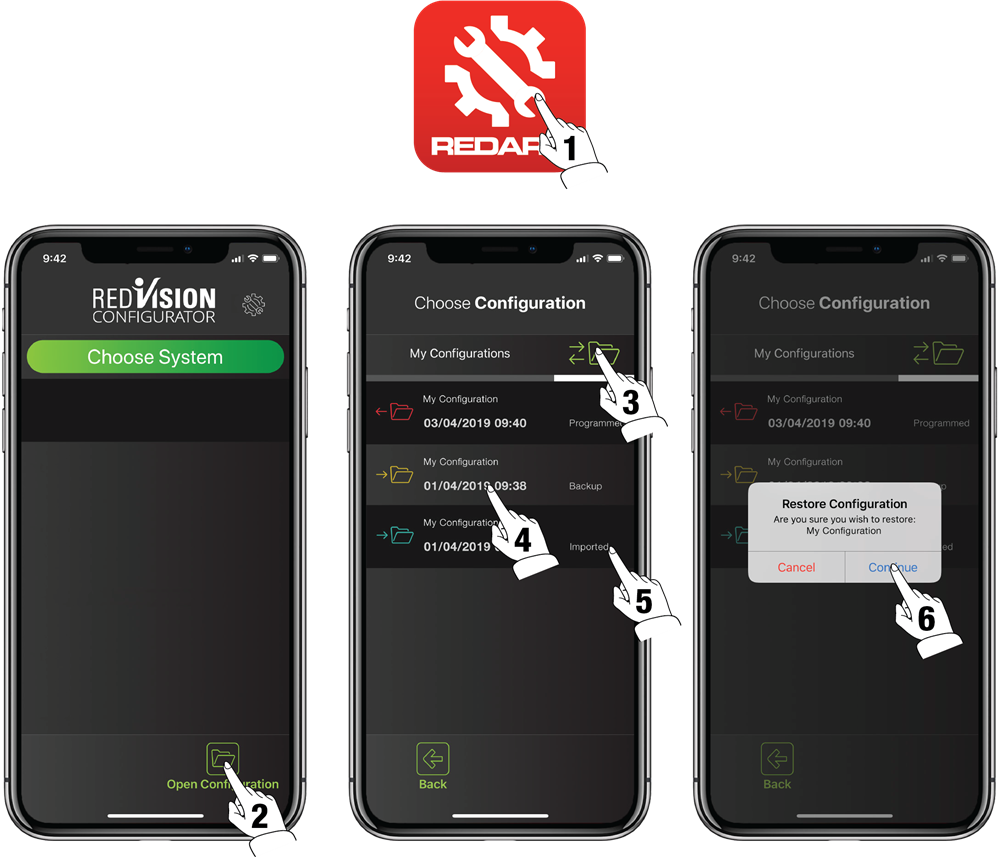
If you have made a mistake while attempting to change the configuration of your RedVision Total Vehicle Management System, follow the instructions as follows.
- Open the RedVision Configurator App.
- Tap on the Open Configuration button.
- Navigate to the History Folder.
- Use the date and time information on each backup to select a suitable configuration for when you last remember
the system working properly. - The available backups are also labelled to help identify which files have been imported, backed up, or programmed.
- Select the configuration from which you wish to restore and confirm when prompted.