The Manager30 may display a "No Battery Sensor Connected" fault when it cannot communicate with the battery sensor. When this occurs, charging is limited to 2A until the issue is resolved.
Troubleshooting involves checking auxiliary battery voltage (must be above 9V), verifying correct voltage at the sensor, and inspecting sensor connections and R-bus terminals for faults.
If no issue is found, a reset should be performed by disconnecting all charging sources, the Manager30, and the battery sensor before reconnecting.
REDARC recommends seeking the support of a qualified auto electrician or technician.
Important
For your safety, REDARC recommends installation by a qualified auto electrician or technician. Our trusted REDNetwork is made up of professional auto electrical businesses certified by REDARC to install the complete of REDARC solutions. Find Your Local Installer
This information is applicable to the following products:
- The Manager30 S2 (BMS1230S2)
- The Manager30 S3 (BMS1230S3, BMS1230S3-NA)
- The Manager30 S3 with RedVision Screen (BMS1230S3R, BMS1230S3R-NA)
How does this fault appear?
The Manager30’s display will show the ‘No Battery Sensor Connected’ message.
How does this fault occur?
This fault occurs when the Manager is unable to communicate with the Battery Sensor.
Important
In this article we explain the need for testing to determine the cause of the issue. Testing may involve changes to the installation or wiring. For your safety and accuracy, REDARC recommends engaging a REDNetwork member or a suitably qualified auto electrician - Find Your Local Installer
Diagnostic flowchart
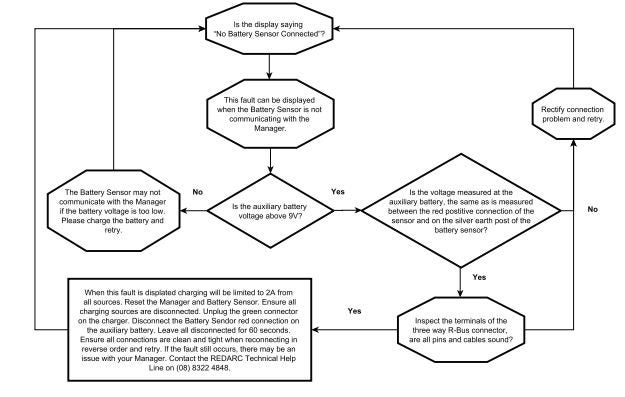
How to troubleshoot
- Confirm the fault message. If the message is not shown, no further action is needed. If the message is displayed, proceed to the next step.
- This fault is displayed when the battery sensor is not communicating with the Manager. As a result, charging will be limited to 2A from all sources until the fault is cleared.
- Check the battery voltage by measuring the voltage of the auxiliary battery.
- If it is below 9V the battery sensor may not be communicating properly. Charge the battery and retry.
- If the voltage is above 9V, proceed to the next step.
- Measure the voltage at the auxiliary battery and compare it with the voltage measured between:
- The positive connection and the silver earth post of the battery sensor.
- If the voltages are not the same, rectify the connection issue and retry.
- If the voltages are the same, proceed to the next step.
- The positive connection and the silver earth post of the battery sensor.
- Inspect the battery sensor connection, including the terminals on the R-bus connector on the sensor.
- Ensure that all pins are intact and undamaged and cables are sound and properly seated.
- If an issue is found, correct it and retry.
- If no issue is found, reset the Manager and Battery Sensor as below.
How to reset the Manager and Battery Sensor
If any of the above steps do not resolve the fault, follow these instructions to reset the Manager30 and battery sensor.
- Disconnect all charging sources.
- Unplug the green connector from the Manager30.
- Disconnect the battery sensor's red connector from the auxiliary battery.
- Leave everything disconnected for at least 60 seconds.
- Reconnect all components in reverse order.
- Retry.
If the issue persists the Manager unit may have an internal issue, we recommend contacting REDARC’s Technical Support Team.