Wiring a BCDC and Manager30 in parallel is a quick way to increase charge rate while maintaining your battery charge information.
Something that is becoming common practice due to huge power usage requirements associated with modern day applications is the necessity of parallel charging with multiple devices to increase the charging current potential.
REDARC chargers can be connected in parallel to increase the charge output and cater for these modern power demands. It is quite common to wire an additional BCDC charger in parallel with REDARC’s 30A charger the Manager30.
REDARC recommends seeking the support of a qualified auto electrician or technician.
Important
For your safety, REDARC recommends installation by a qualified auto electrician or technician. Our trusted REDNetwork is made up of professional auto electrical businesses certified by REDARC to install the complete of REDARC solutions. Find Your Local Installer
This information is applicable to the following products:
- Manager30 Battery Management System (BMS1230S3, BMS1230S3-xx, BMS1230S3R, BMS1230S3R-xx)
- BCDC Classic Range (BCDC1225D, BCDC1240D, BCDC1250D)
There are 2 configurations when installing a BCDC with a Manager30. These are:
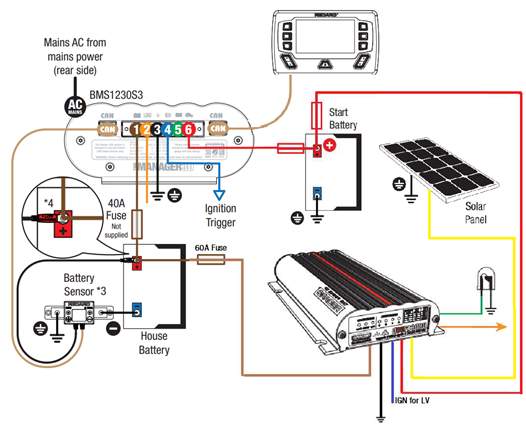
- Manager30 and BCDC with solar through the BCDC
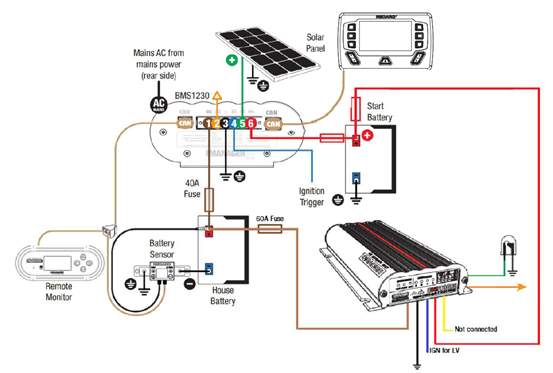
- Manager30 and the BCDC with solar through the Manager30 solar input
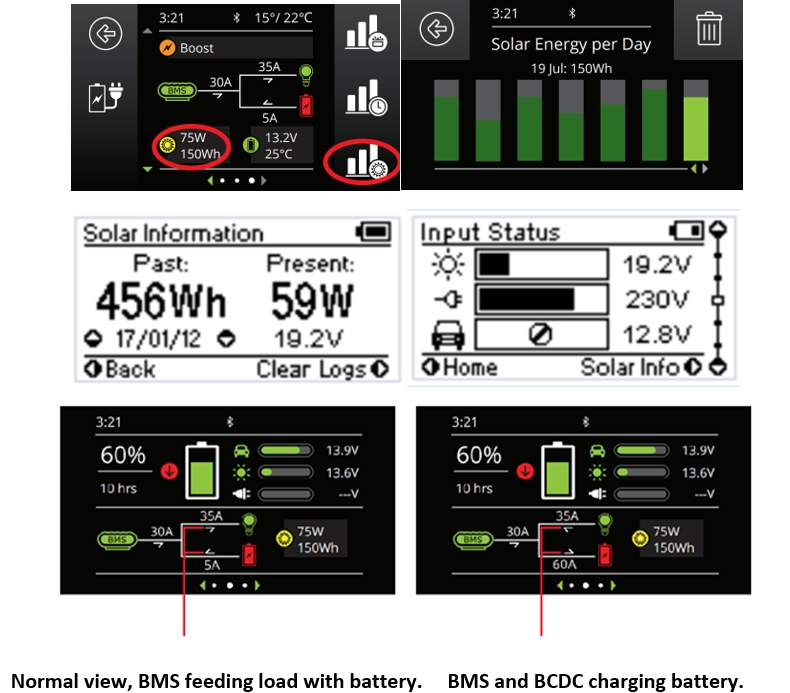
Please note, when running solar via the BCDC, solar power, solar input and solar logs will NOT be displayed on the Manager30 screen.
Things you will see on the screen

- From time to time the load will appear to be charging the battery.
- The SOC will be accurate because the battery sensor will calculate the totals.
- When solar is connected and the BCDC is charging the auxiliary battery, the system will register the current direction and the screen will show the load charging the battery. This is depicted by an arrow from the load pointing toward the battery contrary to standard operation.
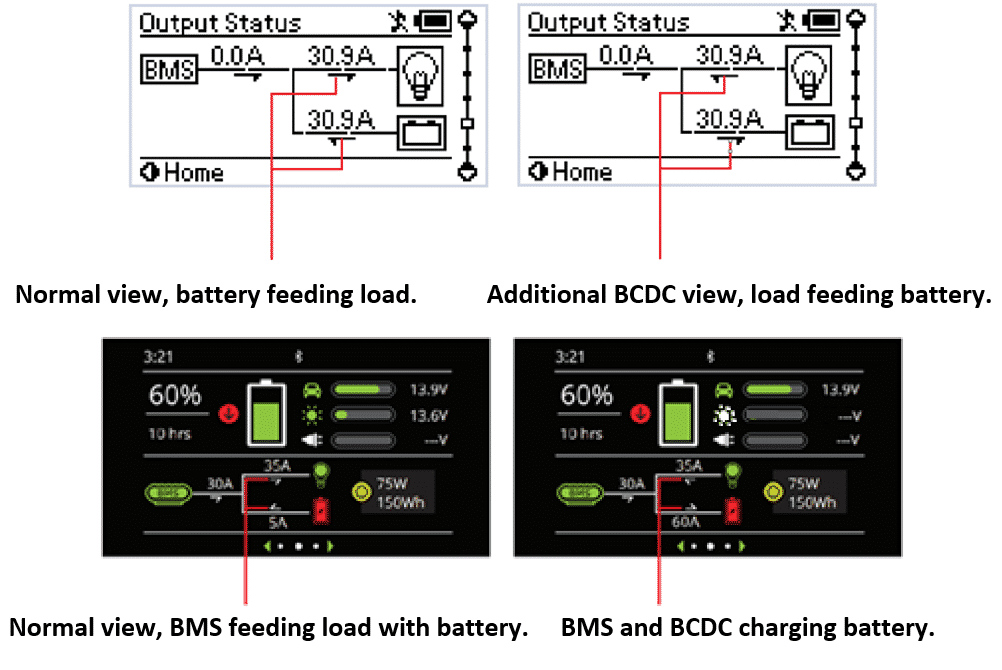
In either configuration, the battery sensor will then calculate the total current received by the battery and display the correct state of charge and time until flat/full.
For the Manager30 to display the correct state of charge it needs to register all incoming current. To ensure this occurs, the BCDC ground connection (black wire) must be connected to a common ground point and NOT the auxiliary battery negative. Failure to connect the earth wire to a common ground will result in the charge provided by the BCDC to bypass the battery sensor (shunt) and result in inaccurate battery state of charge calculations.
The load arrow will only reverse when the BCDC is charging at a higher rate than the load. For example, if the load is 5A and the charge from the BCDC is 10A, the arrow will be reversed and show 5A from the load. If the BCDC is not charging the screen will behave as normal, unless the solar input for the BCDC is being used, in which case the same as above will occur, (load and charge rate dependant).
Screen behaviour when running an induction cooker with the BMS and BCDC in parallel
| Load drawn from battery | 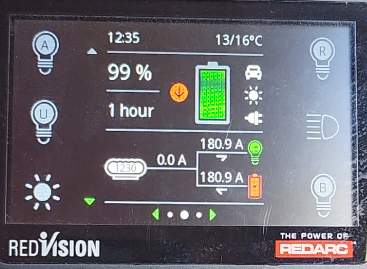 |
| Water boiling |  |
| Charging with load running | 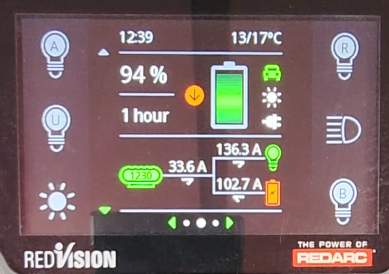 |
| Charge with no load | 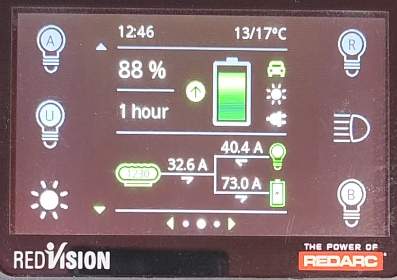 |
| Charging on app | 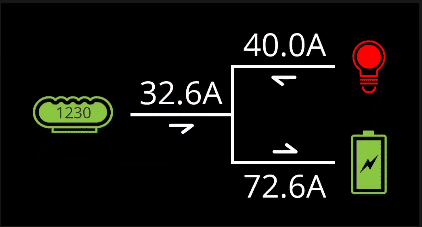 |
Wiring the different configurations
MANAGER30 AND BCDC WITH SOLAR VIA THE BCDC
MANAGER30 AND BCDC WITH SOLAR VIA THE MANAGER30 INPUT
Additional features
You will also be able to utilise the extra solar regulator in the Manager30 or BCDC via the additional solar input and your portable solar panels or blankets.
Perfect for when you are camped under shade and require some additional solar to assist your batteries.
When using the Manager30 as a supplementary solar input the solar input, wattage information and solar charge logs will show only the percentage produced by the portable panels connected to the Manager30.
Considerations
The ability to push large amounts of power into your batteries is extremely useful however there are several things to consider before installing multiple BCDC chargers into a vehicle.
These are:
- How much power is required for the system? Will the batteries charge effectively in a timely manner?
- What are the total loads being drawn from the system? Will the batteries support the loads?
- Can the batteries handle the high current? All batteries have a specified maximum charge rate.
- Most importantly: How much power is available from the alternator? To provide power to the batteries, the BCDC's must have the power available from the alternator. In some cases the alternator will need to be upgraded.
Vehicle alternator
In ideal operating conditions, where the vehicle's own electrical load, start battery, vehicle accessories and engine management systems demands are relatively low and engine speed is above idle, the alternator will have some surplus capability. the BCDC is able to adapt its input current draw to deliver more power to the auxiliary battery.
Using Adaptive Current Management technology, the Manager30 and BCDC chargers ensure that, under all vehicle operating conditions, your auxiliary battery system is receiving the optimal charge available from your vehicle without compromising its safety and reliability.