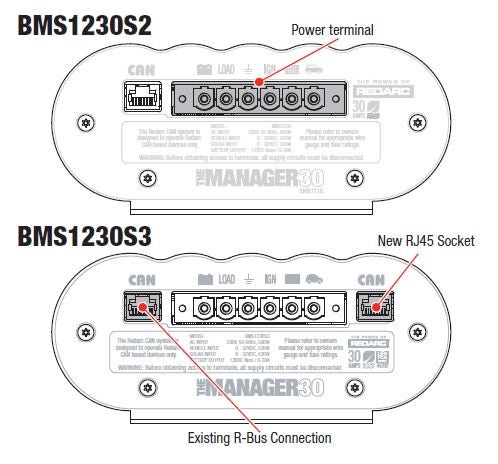
The new Manager30 S3 charger design includes a second RJ45 socket but no longer has a built-in terminating resistor, aligning it with REDARC’s R-Bus standard.
When replacing an S2 unit with an S3, the installation remains the same, except a terminating resistor must be added to one RJ45 socket. REDARC supplies the S3 with the resistor in place.
Replacement involves removing the S2 connections and unit, mounting the S3, fitting the terminating resistor, and reconnecting the power, R-Bus cable, and AC cord.
REDARC recommends seeking the support of a qualified auto electrician or technician.
Important
For your safety, REDARC recommends installation by a qualified auto electrician or technician. Our trusted REDNetwork is made up of professional auto electrical businesses certified by REDARC to install the complete of REDARC solutions. Find Your Local Installer
This information is applicable to the following products:
- Manager30 S2 Battery Management System (BMS12030S2)
The new generation charger design for REDARC's Manager range includes a second RJ45 socket, but now has the in-built Terminating Resistor removed to align the product with REDARC's R-Bus Standard.
When replacing a charger in an existing S2 setup, the new S3 charger can be used and the install can remain exactly the same. We simply need to add a terminating resistor to the second RJ45 socket.
In the even that a customers S2 charger is to be replaced with an S3 charger, REDARC will supply the unit with the terminating resistor in-place.
How to replace the charger
1. Remove the AC cord from the existing S2 unit
2. Remove the R-Bus cable from the S2 unit
3. Remove the green coloured Power terminal from the S2 unit
4. Unmount and remove the S2 charger
5. Mount the new S3 charger
6. Ensure the terminating resistor is inserted in one of the RJ45 sockets, and the R-Bus cable is inserted in the other RJ45 socket
7. Re-connect the green coloured Power terminal
8. Re-connect the R-Bus cable
9. Re-connect the AC cord