The Tow-Pro Link Electric Brake Controller can be paired with the free Tow-Pro App, giving users remote access to brake controller functions, fault history, device info, and firmware updates. Pairing requires the vehicle to be stationary with the trailer connected, ignition on, and brake pedal pressed while selecting the device in the app to complete setup.
REDARC recommends seeking the support of a qualified auto electrician or technician.
Important
For your safety, REDARC recommends installation by a qualified auto electrician or technician. Our trusted REDNetwork is made up of professional auto electrical businesses certified by REDARC to install the complete of REDARC solutions. Find Your Local Installer
This information is applicable to the following products:
- Tow-Pro Link Electric Brake Controller (EBRHX-ADH)
The Tow-Pro Link can be controlled remotely via the free Tow-Pro App. The App gives you remote access to the Tow-Pro Link functions, plus additional features including fault history, device information, and firmware update notifications.
Pairing the App
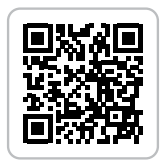
- Download the Tow-Pro Link app from the App Store on iPhone or Google Play Store on Android. The app can be found by scanning the QR code above.
- Ensure your vehicle is stationary.
- Check that your trailer is connected.
- Turn on accessories/ignition (to make sure the Main Unit has power).
- Press and hold the vehicle brake pedal.
- In the Tow-Pro App, select your Tow-Pro from the ‘Unknown Devices’ list.
- The App will attempt to connect, accept the pairing pop-up.
- Once the ‘Reading Configuration’ screen appears, release the vehicle brakes.
- When pairing is successful, the Tow-Pro control screen will be displayed.