GoBlock has the smarts enabling it to regulate the amount of electrical load (current) applied to the vehicles charging system (alternator) as not all vehicles are able to supply the power required for the maximum GoBlock charge rate of 50 amps.
GoBlock achieves this by monitoring and, if required, controlling the amount of charge current and therefore regulating the input voltage (starting battery voltage) which is set to a default of 12.7 volts.
This setting ensures GoBlock will not draw the input voltage below 12.7 volts and also ensures the GoBlock only draws power when the vehicle’s alternator is charging.
REDARC recommends seeking the support of a qualified auto electrician or technician.
Important
For your safety, REDARC recommends installation by a qualified auto electrician or technician. Our trusted REDNetwork is made up of professional auto electrical businesses certified by REDARC to install the complete of REDARC solutions. Find Your Local Installer
This information is applicable to the following products:
- GoBlock Portable Power System (PPS12100, PPS12100-NA)
To be so widely compatible the GoBlock has the smarts enabling it to regulate the amount of electrical load (current) applied to the vehicles charging system (alternator) as not all vehicles are able to supply the power required for the maximum GoBlock charge rate of 50 amps.
GoBlock achieves this by monitoring and, if required, controlling the amount of charge current and therefore regulating the input voltage (starting battery voltage) which is set to a default of 12.7 volts. This setting ensures GoBlock will not draw the input voltage below 12.7 volts and also ensures the GoBlock only draws power when the vehicle’s alternator is charging.
Setting thresholds below 12.7V
Through the RedVision App, the GoBlock provides the option to reduce the input turn off threshold.
Setting the DC input threshold below 12.7 volts allows the GoBlock to apply additional load (current) to the charging system which can result in an increase in the GoBlock's charge rate and therefore decreasing charge time.
You may also consider changing this setting if you have a vehicle with a variable voltage (smart) alternator that most late model vehicles are equipped with.
There are three selectable input voltage settings of 12.7 volts (default), 12.4 volts and 12.0 volts. Changing the input voltage threshold can be achieved through the Redvision app.
For further details on downloading, connecting to, and using the Redvision app please refer to the GoBlock user manual from page 23.
Changing DC input threshold
- Open Redvision app and connect to your GoBlock
- Select menu located in the top left hand of the screen
- Select 'product settings' at the bottom of the screen
- Select the desired DC input level (12.7 volts, 12.4 volts or 12.0 volts)
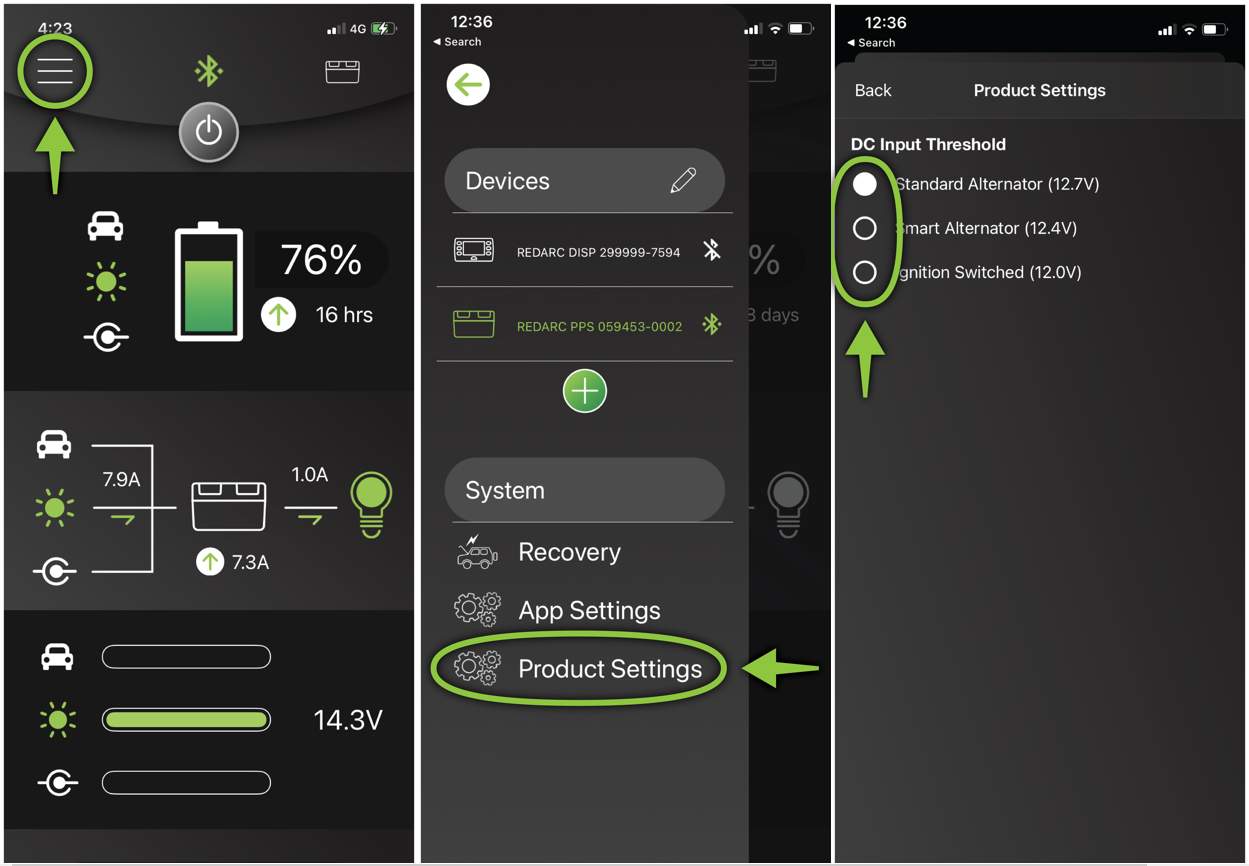
12.7V (recommended for fixed voltage alternator)
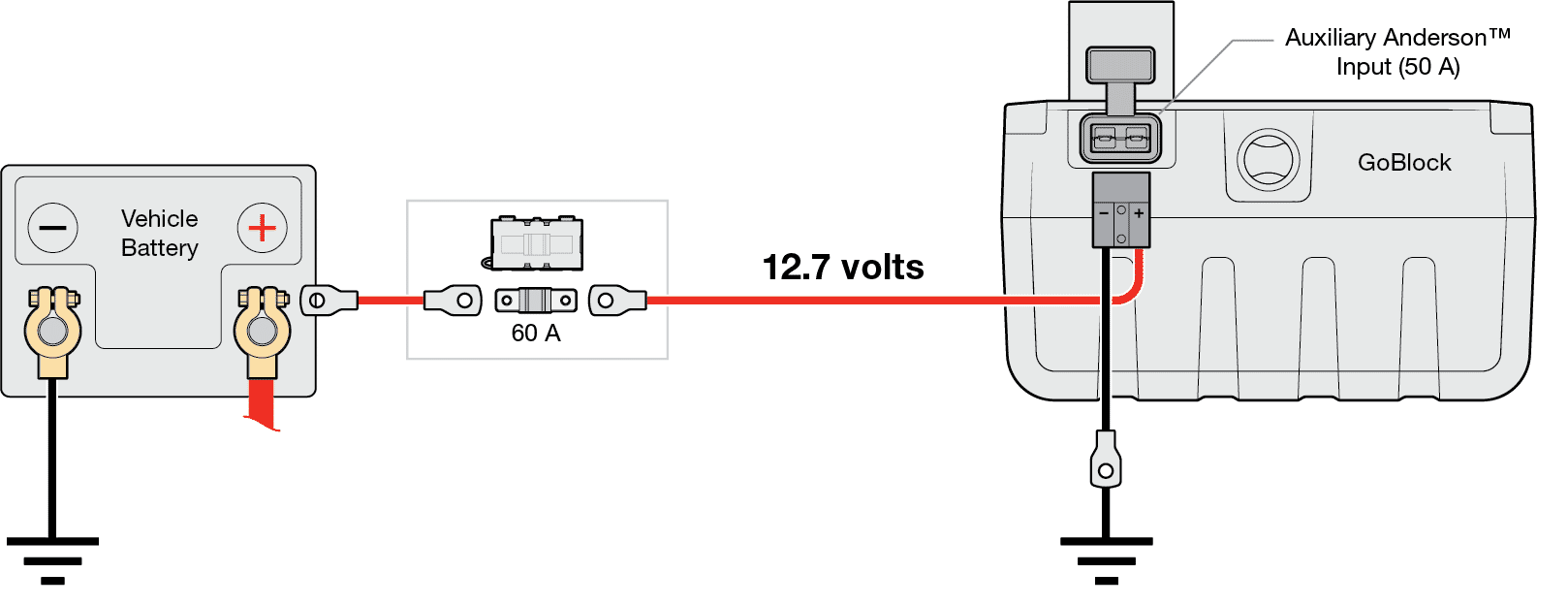
This setting is perfect for standard/Fixed voltage" and "Temperature compensating" alternators.
Suitable for fixed voltage and temperature compensating alternators as the alternators in these charging systems regulate the voltage usually around 14.5 volts and 13.2 volts respectively, which is well above 12.7 volts.
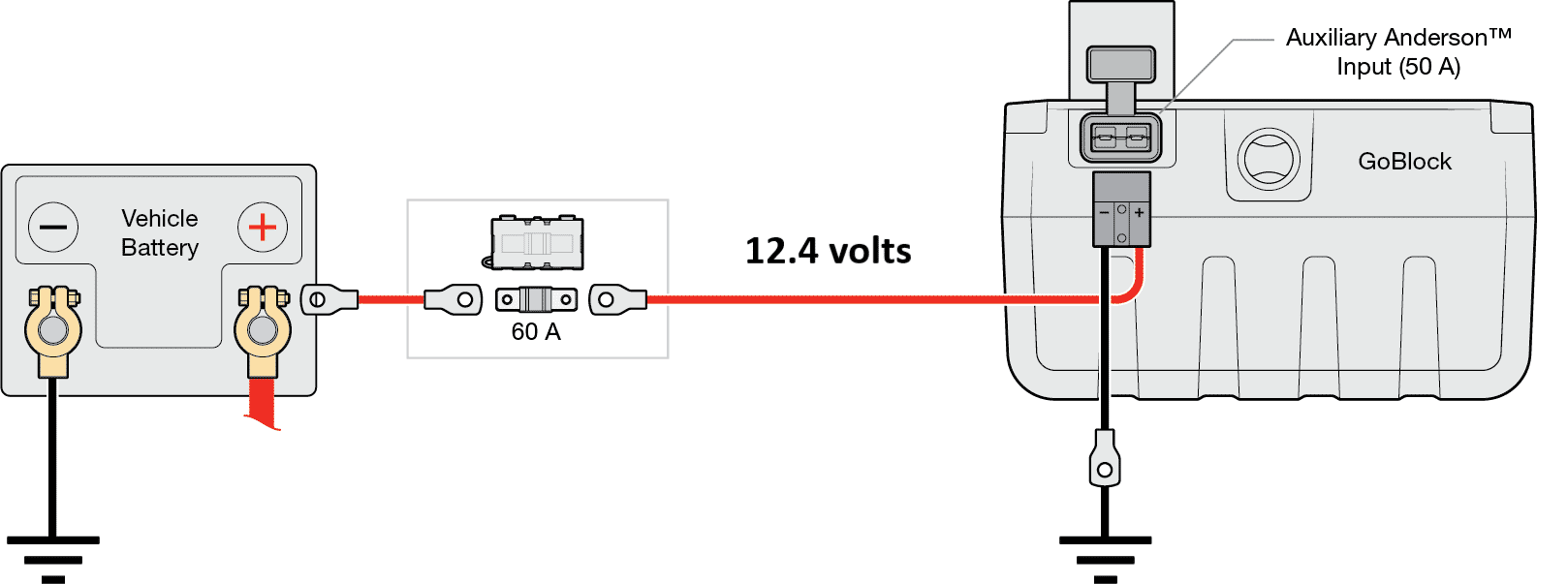
12.4V (recommended for smart alternators and/or increased charging performance)
Suitable for variable voltage and smart alternators this setting will allow the GoBlock to charge and regulate the start battery voltage down to 12.4V, which is approximately 75% of the starting batteries state of charge.
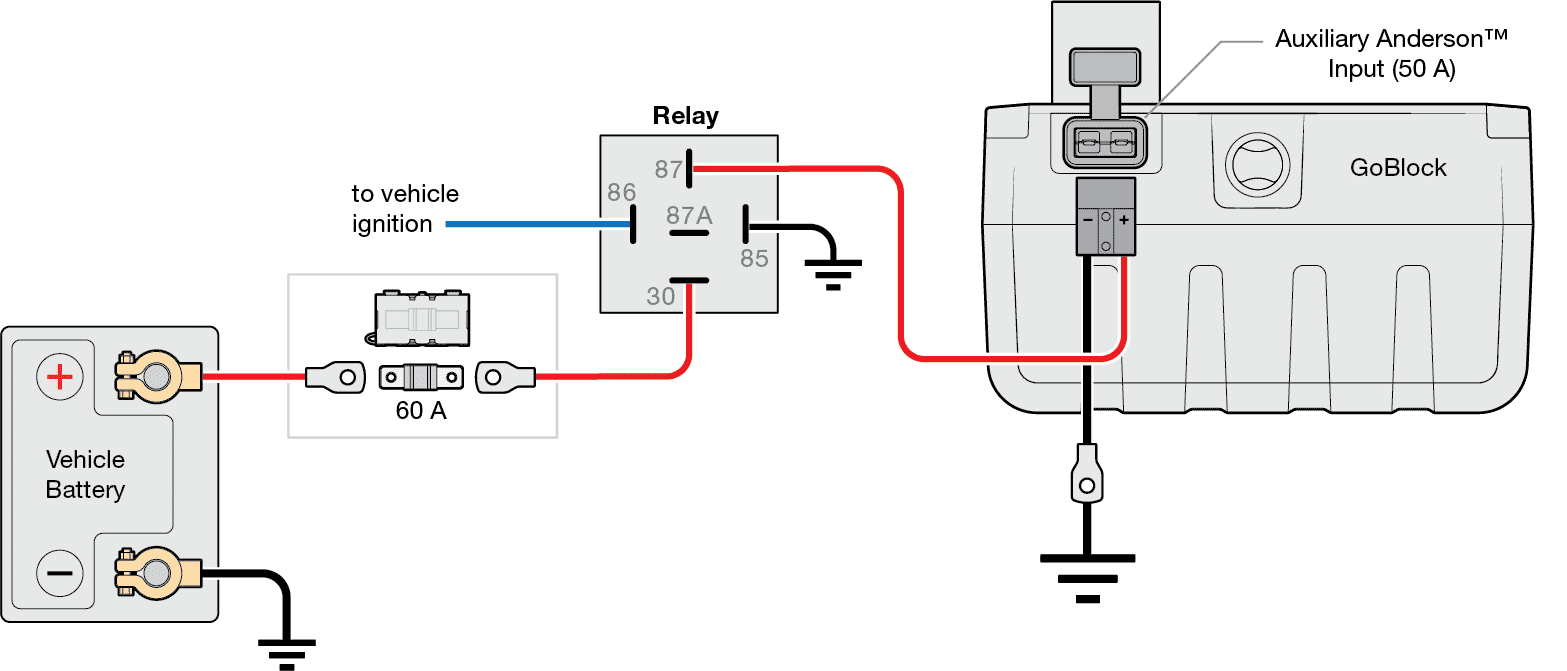
12V (ignition switched)
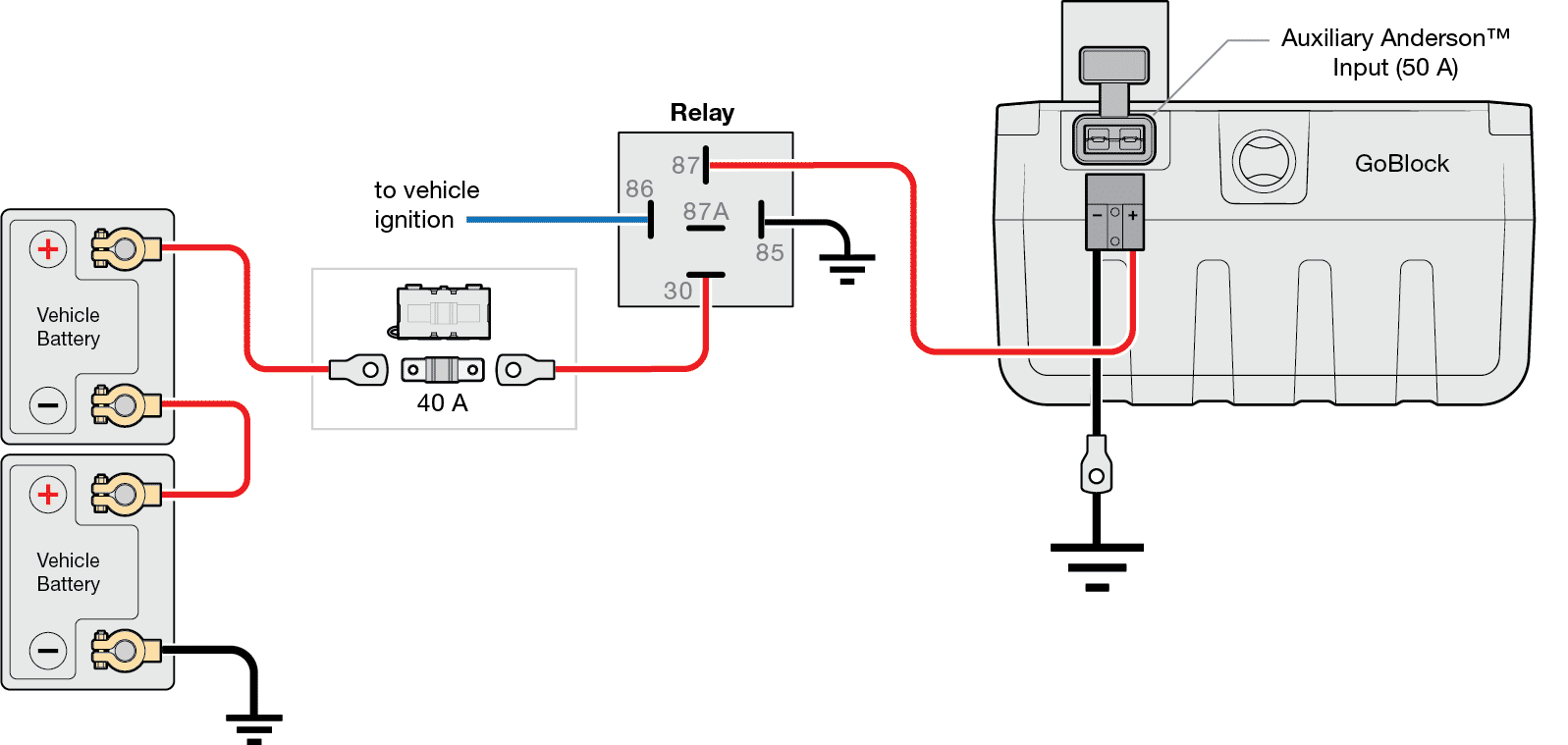
his setting is for the more technically inclined installer that wants 100% charge capability from their variable voltage or smart alternator, and knows how to install an ignition controlled relay.
This setting will allow the GoBlock to charge and regulate the start battery voltage down to 12.0V, this setting will give you maximum charging performance however without the use of an ignition controlled relay may result in the vehicle being unable to start.
Ensure the relay and connections are capable of supporting the continuous max charge current.
Note: an ignition controlled relay must be installed to prevent a flat start battery when the 12.0V setting is selected in the app.
24V (ignition switched)
This setting is for the more technically inclined installer that wants to fast charge from their 24V vehicle alternator, and knows how to install an ignition controlled relay.
Note: an ignition controlled relay must be installed to prevent a flat start battery when charging from a 24V vehicle alternator.
Ensure the relay is 24V and connections are capable of supporting the continuous max charge current.
What to do if using the PowerDock?
When utilising the GoBlock PowerDock the blue ignition wire overrides the app so it is recommended to set the app to 12.7V.
When GoBlock is in the PowerDock and the vehicle ignition is on, the GoBlock will charge at the 12.0V setting.
When the Ignition is turned off the GoBlock will revert to the selected App setting.
Important things to remember
- 12.4 volts is approximately 75% SOC of a start battery.
- There are 3 input voltage voltage settings for the GoBlock; 12.7V - Standard Alternator, 12.4V - Smart Alternator and 12.0V - Ignition Switched