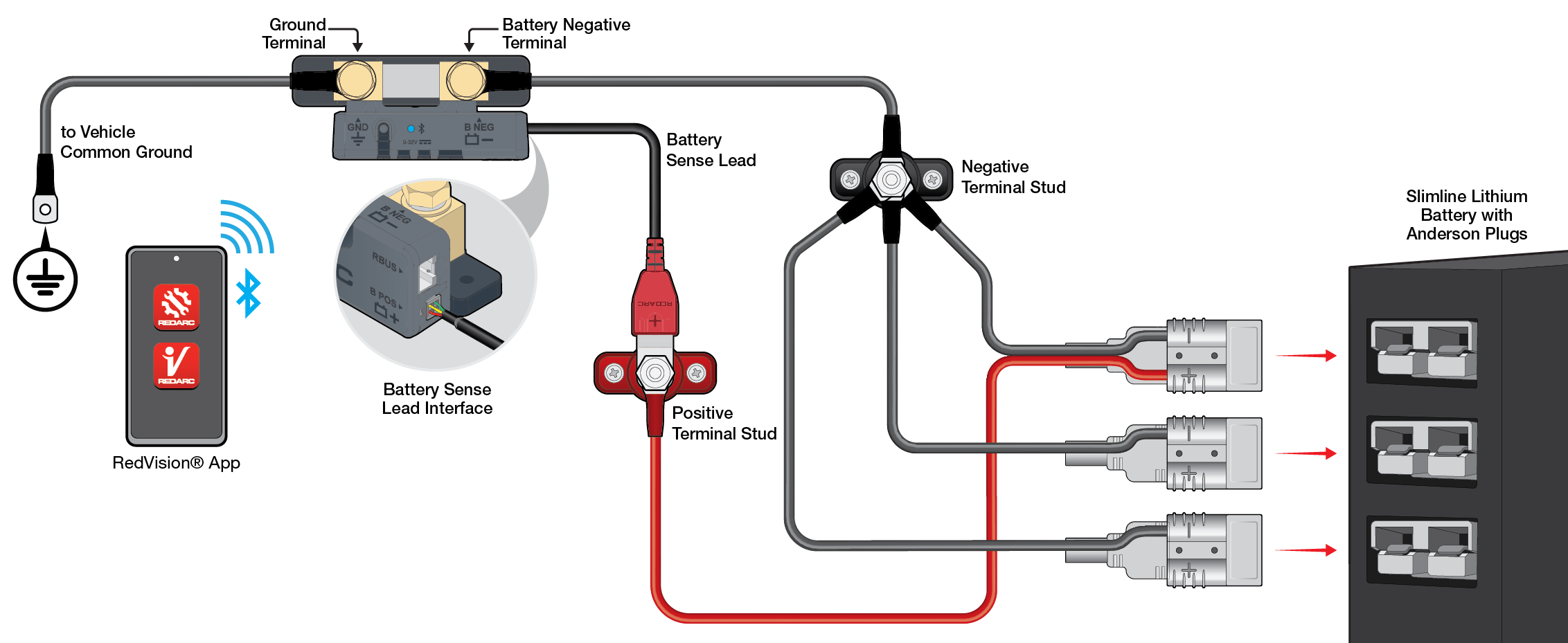
The Smart Battery Monitor can be used with slimline lithium batteries that replace traditional terminals with Anderson plugs. These batteries are popular for space-saving installs, such as behind seats or in canopy systems.
The provided wiring guide and schematic show how to correctly integrate the BSEN500 with Anderson plug terminals to ensure accurate monitoring.
REDARC recommends seeking the support of a qualified auto electrician or technician.
Important
For your safety, REDARC recommends installation by a qualified auto electrician or technician. Our trusted REDNetwork is made up of professional auto electrical businesses certified by REDARC to install the complete of REDARC solutions. Find Your Local Installer
This information is applicable to the following products:
- Smart Battery Monitor (BSEN500)
There are numerous brands of batteries on the market which come in various shapes and sizes. Slimline batteries have become very popular for their space saving capabilities being able to mount behind rear seats or behind back planes within canopy power systems.
There are a few battery brands out there that have chosen to do away with the conventional battery terminals and replaced them with Anderson plugs.
The wiring guide and schematic below shows you how to correctly wire them utilising a Smart Battery Monitor (BSEN500). In this example, an Anderson plug is used with a positive terminal.

The below example features a slimline lithium battery with Anderson plug terminals.