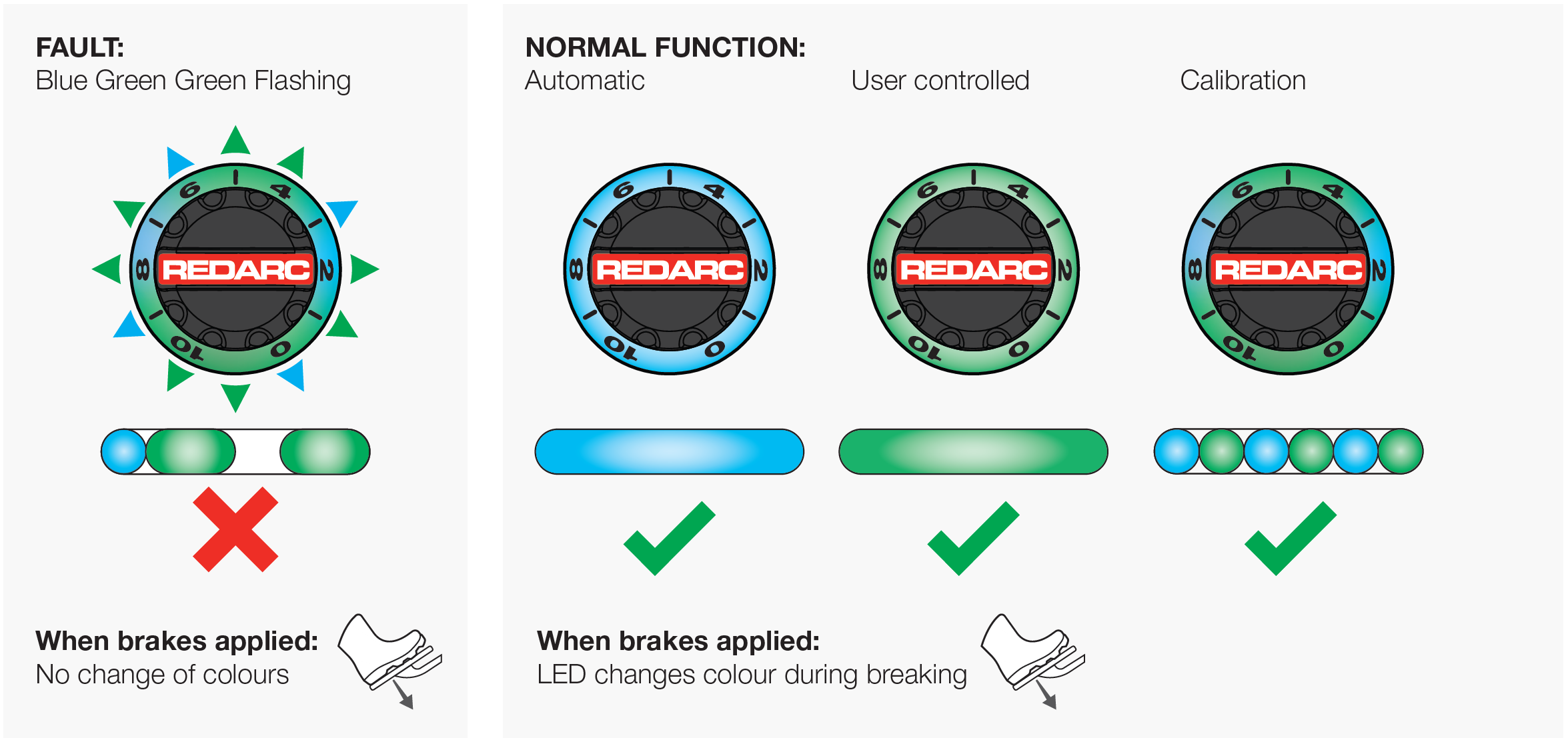
If the Tow-Pro Elite V2 or V3 displays one short blue flash followed by two green flashes, it indicates a start-up fault that typically occurs after reconnecting the trailer.
Towing should not be attempted while this fault is active, as it may cause unreliable trailer braking or brake light failure.
The fault can often be cleared with a soft reset by disconnecting and reconnecting the trailer plug, or with a hard reset by temporarily removing power from the Tow-Pro unit.
If the fault continues or reappears after reconnection, the unit may require a software update to prevent recurrence.
REDARC recommends seeking the support of a qualified auto electrician or technician.
Important
For your safety, REDARC recommends installation by a qualified auto electrician or technician. Our trusted REDNetwork is made up of professional auto electrical businesses certified by REDARC to install the complete of REDARC solutions. Find Your Local Installer
This information is applicable to the following Tow-Pro Electric Brake Controllers:
- Tow-Pro Elite V2 (EBRH-ACCV2)
- Tow-Pro Elite V3 (EBRH-ACCV3)
How will this appear?
The Tow-Pro remote head LED will display a flashing sequence of 1 short Blue flash followed by 2 Green flashes. It can occur at start-up when the user reconnects their trailer to the vehicle.
Can I still tow with this fault?
Do not tow with the Tow‑Pro® Elite while a fault code is active. Fault codes of the Tow‑Pro® Elite may indicate conditions that make it unsafe or illegal to tow, including unreliable trailer brakes or failure of brake lights
What does this fault mean?
Start Up Fault: Usually after connecting the trailer.
What causes this fault?
Below is the common cause and repair.
Important
In this article we explain the need for testing to determine the cause of the issue. Testing may involve changes to the installation or wiring. For your safety and accuracy, REDARC recommends engaging a REDNetwork member or a suitably qualified auto electrician - Find Your Local Installer
The fault code can be cleared doing a Soft or Hard Reset as per instructions below.
- Disconnect the trailer plug from the rear of the vehicle.
- Press the manual override button twice and wait at least one minute.
- Reconnect the trailer plug.
- Check the remote head has returned to a permanent blue (automatic mode) or green (user controlled).
The fault may re-occur after another disconnection / reconnection of the trailer.
To prevent the recurrence of this fault, fitted units will require a software update.