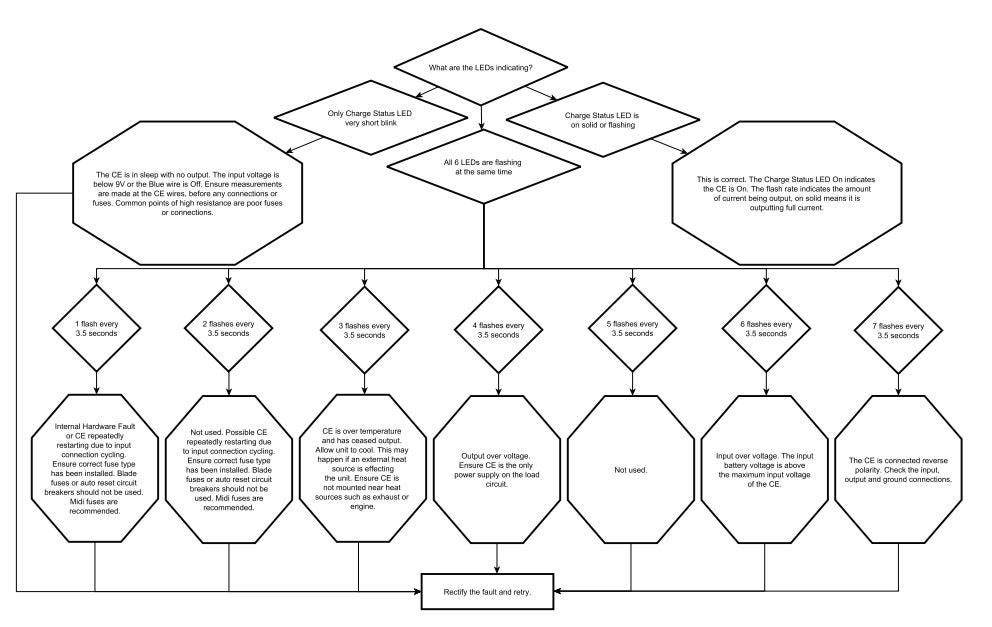
A flashing LED on a REDARC Charge Equalizer (CE20, CE25, CE40) indicates an operating condition or fault.
Troubleshooting involves checking voltages with a multimeter, inspecting fuses and wiring, confirming polarity, and reducing load if overheated.
REDARC recommends seeking the support of a qualified auto electrician or technician.
Important
For your safety, REDARC recommends installation by a qualified auto electrician or technician. Our trusted REDNetwork is made up of professional auto electrical businesses certified by REDARC to install the complete of REDARC solutions. Find Your Local Installer
This information is applicable to the following products:
25A Charge Equalizer (CE25)
40A Charge Equalizer (CE40)
How will this appear?
The Charge Equalizer’s Charge Status LEDs will flash in specific patterns. These flashes occur in cycles every 3.5 seconds and indicate different operating conditions or faults.
Solid or flashing Charge Status LED: The charge equalizer is operating. A solid LED means it is supplying full current. A flashing LED means it is supplying partial current.
All LEDs flashing together: The CE has detected a fault. The number of flashes identifies the type of fault.
What do the flashing sequences mean?
1 flash: Internal hardware fault or restart due to poor input wiring.
2 flashes: CE repeatedly restarting from input wiring/fuse issues.
3 flashes: CE has overheated and shut down output.
4 flashes: Output over-voltage caused by no load or disconnection.
6 flashes: Input voltage above maximum rating.
7 flashes: Reverse polarity on input or output wiring.
Tools required
Digital multimeter (for checking voltages and wiring)
Correct fuses (MIDI fuses recommended)
Basic hand tools for checking wiring connections
Important
In this article we explain the need for testing to determine the cause of the issue. Testing may involve changes to the installation or wiring. For your safety and accuracy, REDARC recommends engaging a REDNetwork member or a suitably qualified auto electrician - Find Your Local Installer
How to troubleshoot
Check input voltage directly at the CE wires to confirm correct supply.
Inspect fuses and circuit breakers — use only correct-rated fuses (MIDI recommended).
Check for poor connections or damaged wiring at both input and output.
If overheated, allow the unit to cool and reduce load.
Confirm polarity on all connections before reconnecting.
After rectifying the issue, retest the system.
If the fault continues, contact REDARC Technical Support.
Diagnostic chart