If the BCDC Alpha shows a flashing H status LED with the Control Button LED on, it indicates a hard fault caused by wiring or installation issues, and charging will stop. Common causes include reverse polarity on the auxiliary battery or loose/poor connections at the start battery, fuse holder, or ground.
To resolve, check and correct wiring, clean and secure all connections, verify solid crimps, then perform a full power cycle reset by disconnecting and reconnecting components in the correct order.
REDARC recommends seeking the support of a qualified auto electrician or technician.
Important
In this article we explain the need for testing to determine the cause of the issue. Testing may involve changes to the installation or wiring. For your safety and accuracy, REDARC recommends engaging a REDNetwork member or a suitably qualified auto electrician - Find Your Local Installer
This information is applicable to the following BCDC Alpha chargers:
- BCDC Alpha 25A (BCDC12025B)
- BCDC Alpha 50A (BCDC12050B)
What does this look like?
The BCDC Alpha H status LED and Control Button LED will flash.
This fault condition is a hard fault and therefore the Control Button LED will be on while the H status LED flashes.
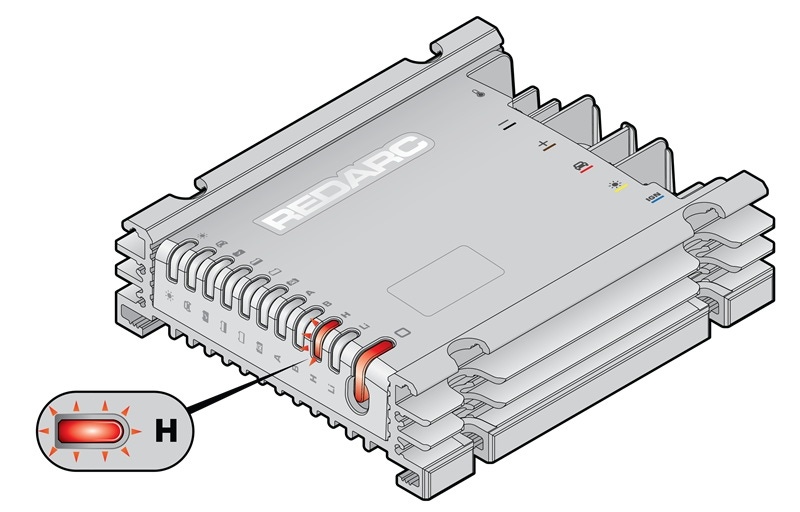
What does the flashing 'H' LED mean?
This fault indicates that the BCDC Alpha has detected an issue with the wiring and/or installation.
Will the BCDC Alpha still charge my battery in this condition?
In this fault condition, being a hard fault, the BCDC Alpha will cease charging.
What can cause this fault?
- Reverse Polarity power supply
- Loose or poor ground to the BCDC Alpha
How to determine the cause?
Below is a list of the common causes and repairs.
A) REVERSE POLARITY
Upon initial installation, if the auxiliary battery terminals (+ and -) are wired to the BCDC Alpha in reverse polarity. Things to check:
- Ensure wiring to BCDC Alpha is correct.
- If wiring is incorrect, rectify wiring.
- Refer to step B.
B) LOOSE CONNECTION AT THE START BATTERY TERMINAL/FUSE HOLDER OR LOOSE GROUND CONNECTION AT THE BCDC
Things to check:
- Ensure connection points are clean, not damaged or loose.
- Remove the battery terminal and ensure a clean surface area is provided for the terminal.
- Inspect the ground wire (-) to ensure it has a suitable ground connection, including ensuring the terminal is attached to bare metal (an unpainted surface).
- Ensure each crimp connection is strong, a small tug on each wire can confirm this.
- Refer to step C.
C) CARRY OUT POWER CYCLE PROCEDURE
Once steps A and B have been completed, it's advisable to carry out a full power cycle to reset the BCDC Alpha.
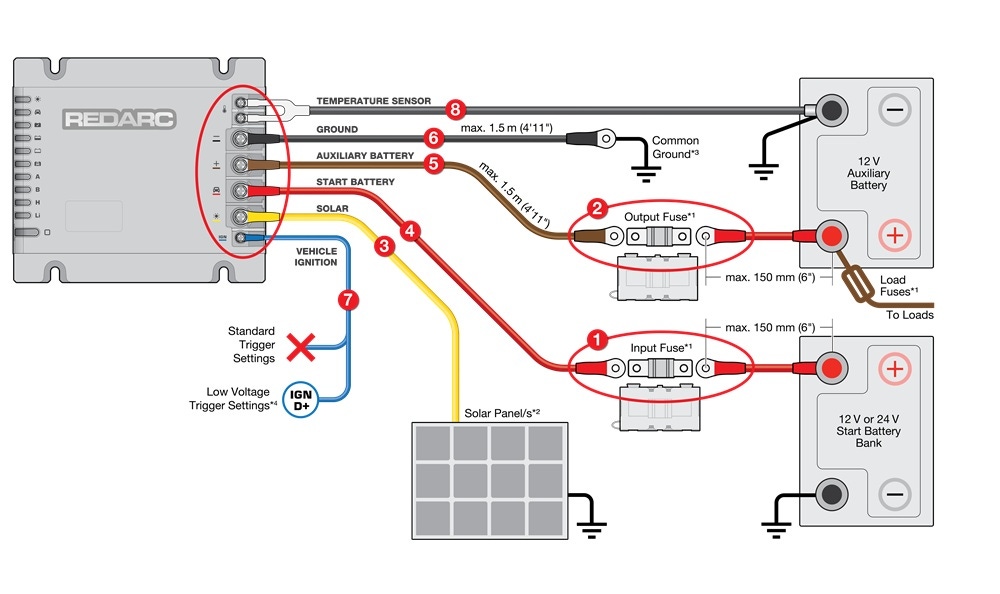
This is achieved by following the disconnection and reconnection procedure listed below:
DISCONNECT PROCEDURE
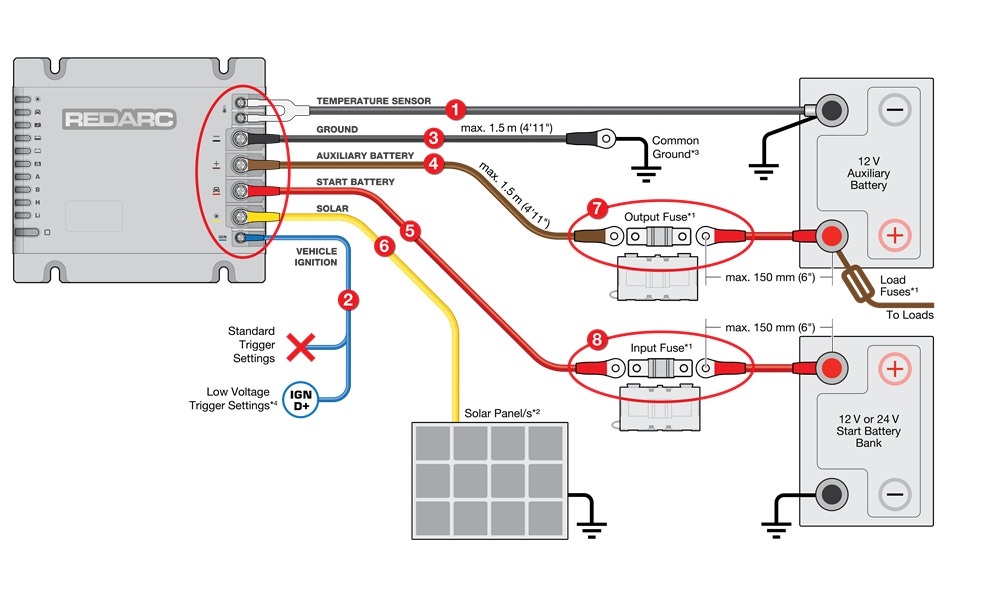
- Start Battery Fuse
- Auxiliary Battery Fuse
- Solar
- Start Battery
- Auxiliary Battery
- Ground
- Vehicle Ignition
- Battery Temperature Sensor
RECONNECT PROCEDURE
After being disconnected for 5 minutes, reconnect the BCDC in the following order:
- Battery Temperature Sensor
- Vehicle Ignition
- Ground
- Auxiliary battery
- Start battery
- Solar
- Auxiliary Battery Fuse
- Start Battery Fuse
- Re-check operation
If problem persists, contact REDARC Technical Support.